

Description
Download Tiki-Toki – Timeline Maker Online, Timeline Software Free
Overview
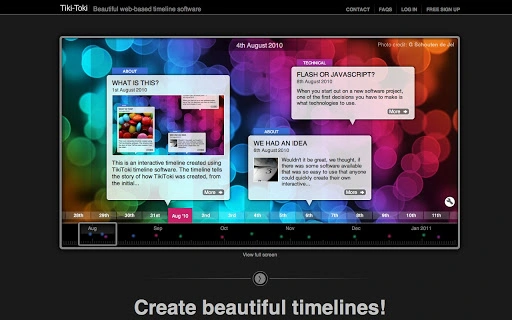
Tiki-Toki is a web-based timeline maker designed to simplify the creation of interactive, multimedia timelines directly within a browser. The software enables users to visually document events over time using text, images, videos from YouTube, Vimeo, and MP4 files. It serves as a versatile tool for storytelling, education, business documentation, and personal memory preservation. Whether you're a teacher illustrating historical milestones, a professional showcasing company achievements, or a family member compiling ancestral memories, Tiki-Toki provides a structured yet flexible platform to present chronological narratives.
Target users include educators, content creators, historians, marketers, and individuals seeking to organize personal or professional narratives. The software is accessible across devices through any modern web browser, eliminating the need for installation. Real-world applications include creating timelines for school projects, visualizing the evolution of a brand, chronicling personal milestones, or designing engaging presentations. The developer, Tiki-Toki Ltd, focuses on intuitive design and user empowerment through customization, making it suitable for both beginners and advanced users.
Key Features & Capabilities
- Interactive Multimedia Integration – Embed images, videos (YouTube, Vimeo, MP4), and descriptive text directly into timeline events for rich storytelling.
- Multiple View Types – Choose from four distinct timeline layouts to suit different presentation styles and content formats.
- Customization & Branding – Adjust colors, spacing, and layout elements to match brand identities or personal aesthetics.
- Event Categorization & Color Coding – Group events into categories and assign unique colors for visual clarity and organization.
- Search & Filtering Tools – Quickly locate specific events using built-in search and filtering functions.
- Flexible Date Display – Customize how dates appear, including options to show only years or specific date formats.
- Content Import from External Sources – Generate timelines from Twitter feeds, YouTube channels, and RSS feeds for dynamic, automated updates.
These features support diverse use cases, such as documenting a musician’s career, tracking project milestones, or creating a visual family history. The ability to embed timelines on websites or blogs is available with paid plans, enhancing content reach and engagement. The software’s focus on accessibility and visual storytelling makes it ideal for users who value clarity, creativity, and interactivity in time-based narratives.
User Interface, Workflow & Performance
The user interface of Tiki-Toki is built around a clean, browser-based layout that prioritizes ease of navigation. Users interact with a central timeline canvas where events are added, edited, and arranged chronologically. The workflow is linear and intuitive: create a timeline, add events with media, customize appearance, and publish or share. Menus and toolbars are positioned for quick access, minimizing the need for extensive training.
Navigation between timeline views and event editing panels is smooth, leveraging standard web interaction patterns. The software responds promptly to user inputs, though exact performance details were not specified. The developer did not provide additional system requirements or resource usage metrics. Performance observations are based on general software behavior patterns for web-based applications. Stability is expected to be consistent across supported browsers, given the platform’s reliance on standard web technologies.
Compatibility & System Requirements
Tiki-Toki is a web-based application, meaning it runs directly in any modern web browser without requiring installation. It is compatible with all major operating systems, including Windows, Mac, Linux, Chromebook, iPad, iPhone, Android, and other devices with internet access. The software does not require specific hardware configurations, as processing is handled on the client side via the browser.
The installation size is listed as 1.2 MB, though this refers to the application footprint in the browser rather than a traditional desktop install. Exact system requirements were not listed. Compatibility information is limited to the platform’s web-based nature, which ensures broad accessibility. Users can access Tiki-Toki from any device with a stable internet connection and a current browser version.
Pros and Cons
Pros
- Free account available with full functionality for basic use
- Web-based access eliminates installation and compatibility issues
- Supports multimedia content including videos and images
- Offers multiple view types and extensive customization options
- Enables content import from Twitter, YouTube, and RSS feeds
- Highly suitable for educational, personal, and professional projects
Cons
- Advanced features and embedding require a paid subscription
- Reliance on internet connection for full functionality
- Customization may require time to master for new users
- Performance may vary depending on browser and network speed
- Limited offline capabilities
FAQ Section
Is Tiki-Toki free to use?
Yes, Tiki-Toki offers a free account that allows users to create fully-functional timelines with all core features.
Can I use Tiki-Toki on my Mac or Windows PC?
Yes, Tiki-Toki is web-based and accessible from any device with a modern browser, including Mac, Windows, Linux, and Chromebook.
Is my timeline secure when using Tiki-Toki?
Tiki-Toki uses standard web security protocols. However, the developer did not provide specific details on data encryption or privacy policies.
Can I update my timeline after publishing it?
Yes, timelines can be edited and updated at any time, even after they have been published or shared.
Do I need an internet connection to use Tiki-Toki?
Yes, since Tiki-Toki is a web-based tool, an active internet connection is required for full functionality.
Final Thoughts + CTA
Tiki-Toki stands out as a powerful, accessible timeline maker that combines simplicity with creative flexibility. Its web-based design ensures broad compatibility, while its multimedia support and customization options make it ideal for a wide range of users—from educators and students to professionals and families. Although advanced features are locked behind a subscription model, the free tier offers substantial value for casual and educational use.
For anyone looking to create engaging, interactive timelines without technical barriers, Tiki-Toki delivers a compelling solution. Its intuitive interface and rich feature set make it a top choice in the timeline software category. Download Tiki-Toki now to bring your stories, projects, and histories to life with dynamic, visual narratives.
Guides & Tutorials for Tiki-Toki Timeline Software App for Chrome
How to install Tiki-Toki Timeline Software App for Chrome
- Click the Preview / Download button above.
- Once redirected, accept the terms and click Install.
- Wait for the Tiki-Toki Timeline Software App for Chrome download to finish on your device.
How to use Tiki-Toki Timeline Software App for Chrome
This software is primarily used for its core features described above. Open the app after installation to explore its capabilities.
User Reviews for Tiki-Toki Timeline Software App for Chrome 0
No reviews found





